How to Replace BLM GeoCommunicator for PLSS Lookups
BLM GeoCommunicator is slow, login-gated, and missing batch and API support. Here's how landmen and surveyors are replacing it with a faster, more capable PLSS lookup workflow.
For about 20 years, if you needed to look up a PLSS township, range, and section, you opened BLM GeoCommunicator. It was the standard: free, official, and built on the same BLM survey data that federal agencies used themselves. Junior landmen were trained on it. Title abstractors bookmarked it. Surveyors kept it open alongside their GIS software.
That era is effectively over.
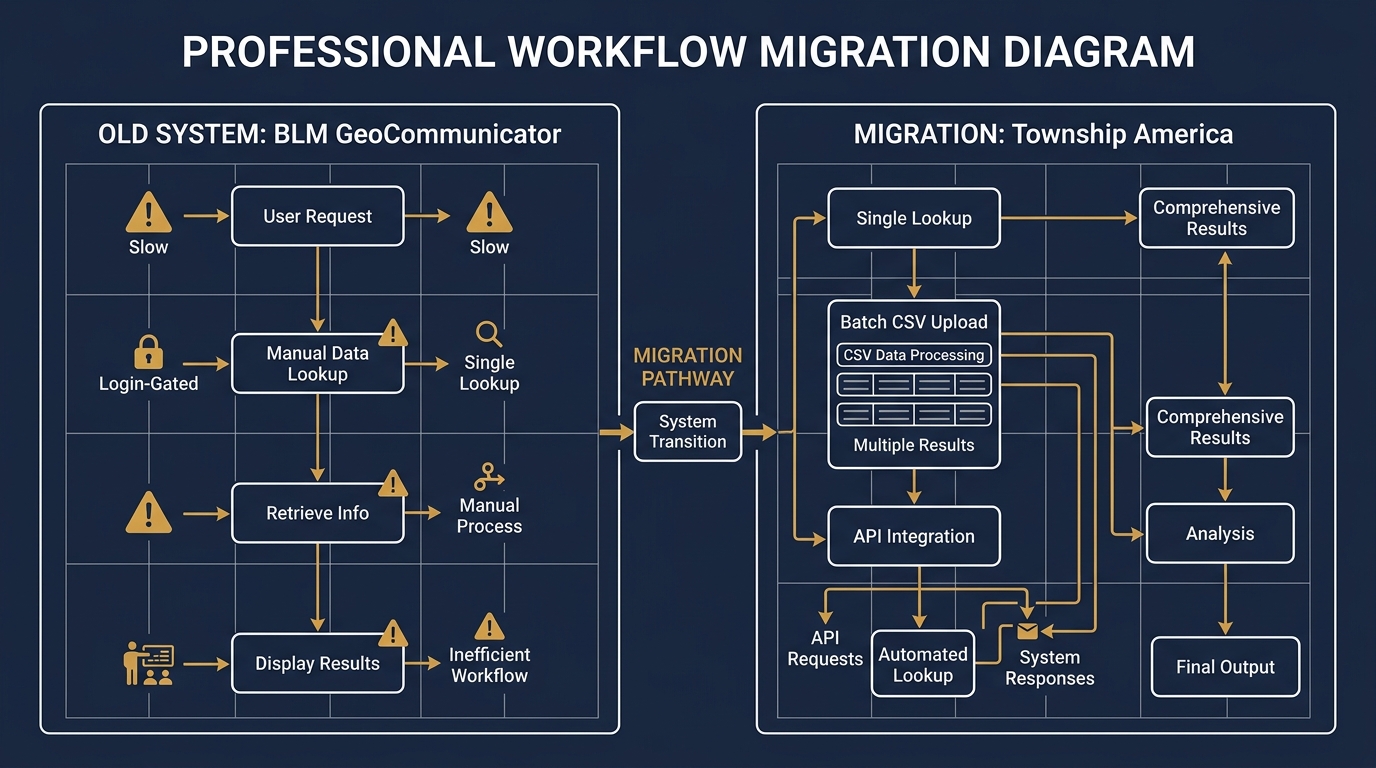
GeoCommunicator still exists in name, but in 2026 it operates somewhere between "barely functional" and "not accessible." The interface is slow, server response times are unreliable, and the tool increasingly requires federal login credentials that most professionals, especially junior staff and outside consultants, do not have. Workflows that once took minutes now stall on an authentication page or time out entirely.
If you are still relying on GeoCommunicator for PLSS lookups, you have already felt this. This post covers what GeoCommunicator actually did, where it falls short even when it works, and how to migrate your workflow to something that handles the same tasks without the friction. BLM GeoCommunicator replacement options do exist, and one of them covers every capability the original tool had, plus several it never offered.
What GeoCommunicator Did
GeoCommunicator was the Bureau of Land Management's public-facing PLSS interface. At its peak, it let you:
- Enter a legal description and see it plotted on a map
- Click a location on an interactive map to identify the Township, Range, and Section
- Download basic coordinate output for PLSS parcels
- View plat map imagery for some areas
For a professional doing occasional lookups, one or two per week, that was enough. The data came from BLM's own records, the price was right, and nothing else matched it for coverage.
The Current State of BLM GeoCommunicator in 2026
The specific problems that have made GeoCommunicator unreliable for professional use:
Access gating. The tool increasingly routes users through federal authentication, with some functions requiring login credentials that contractors, outside counsel, and junior landmen on client accounts may not hold. A lookup that should take 30 seconds turns into an IT support ticket or a workaround through a colleague's computer.
Performance. When GeoCommunicator responds at all, it is slow, often 10 to 30 seconds per lookup. For a title examiner running 40 descriptions per day, that time adds up to hours lost weekly.
No batch capability. GeoCommunicator was never built for volume. You enter one description, you get one result. There is no automation path for any workflow involving more than a handful of lookups.
No API. There is no programmatic interface. You cannot call it from a script, a spreadsheet macro, or any land management software. Everything is manual, every time.
GeoCommunicator vs. Township America
Here is how the two tools compare on the capabilities that matter for professional PLSS workflows:
| Capability | BLM GeoCommunicator | Township America |
|---|---|---|
| Single PLSS lookup | Yes (when accessible) | Yes |
| Reverse lookup (GPS → legal description) | Limited | Yes |
| Quarter-section precision | Inconsistent | Consistent |
| Batch conversion (Business) | No | Yes, unlimited records via CSV |
| API access | No | Yes, REST API, < 200ms average |
| Federal login required | Increasingly yes | No |
| All 37 principal meridians | Yes | Yes |
| Export formats | Basic | JSON, GeoJSON, CSV, KML, Shapefile |
For a single lookup on a good connection, the two tools are comparable in scope. For any kind of volume, integration, or automation, they are in different categories entirely.
Other Alternatives, and Their Limitations
A few other tools get recommended as BLM GeoCommunicator replacements. Here is an honest look:
EarthPoint. EarthPoint's PLSS tool is reliable and easy to use, but it requires a paid subscription and lacks batch conversion or API access. It works well for occasional lookups but does not fit workflow integration.
BLM MapView. BLM's newer mapping portal shows PLSS layers on an interactive map. It is a visual reference tool, not a conversion engine. You can see Section boundaries on a map; you cannot paste in a legal description and get coordinates back.
PLSS Fabric (ESRI/BLM). The National PLSS Fabric is a shapefile dataset available from the BLM. If you work in ArcGIS or QGIS, you can load it and run intersect queries to get PLSS attributes from coordinates. Accurate and official, but it requires GIS expertise, local storage, and manual dataset updates over time.
For a landman or title examiner who wants fast, accurate lookups without managing GIS data locally, none of these fully replaces what GeoCommunicator used to be.
How to Migrate a GeoCommunicator Workflow to Township America
If your team relied on GeoCommunicator for regular PLSS lookups, migrating takes an afternoon:
Single lookups. Replace your GeoCommunicator bookmark with the Township America PLSS converter. Enter the legal description exactly as you have it, T4N R5E Sec 12 NE, Wind River Meridian, and get latitude, longitude, and a map pin. No login required.
Reverse lookups. Drop a pin on the map or enter GPS coordinates to get the legal description back. This covers the GeoCommunicator workflow where you clicked a map location to identify the Township, Range, and Section.
Batch conversion. If your team processes multiple descriptions at once, the batch conversion tool accepts CSV or Excel uploads. A spreadsheet with 500 legal descriptions returns completed with coordinates in seconds. This is a capability GeoCommunicator never had.
API integration. For land management software, internal databases, or automated workflows, the Township America API accepts legal descriptions and returns GeoJSON, legal description in, coordinates out, in under 200ms. For a closer look at how land departments are building this directly into APD workflows, see how landmen are using the PLSS API.
A Real Example: Wyoming Drilling Program
A Wyoming drilling program might have 30 APD locations to verify in a week. The descriptions arrive from the geologist's prospect report:
- T4N R5E Sec 12 NE, Wind River Meridian
- T3N R4E Sec 1 SE, Wind River Meridian
- T5N R6E Sec 24 SW, Wind River Meridian
In GeoCommunicator's functional days, you entered each one manually, screenshotted the map, and recorded coordinates by hand. In Township America, you paste all 30 into the batch converter, download the resulting CSV with coordinates appended, and import it directly into your permit spreadsheet.
For a transposed Range number, R5E typed as R4E, the batch output flags the coordinate shift. Six miles off is a BLM resubmission and a delayed permit. Catching that error before the permit is filed is the job. The batch conversion guide covers the full CSV workflow if you have not run a batch before.
Batch Conversion and API Access: What GeoCommunicator Never Offered
These two capabilities are where the gap between GeoCommunicator and a proper BLM GeoCommunicator replacement is widest.
The batch converter handles the title examination workflow: a county abstract search produces 200 legal descriptions across a mineral rights chain. In GeoCommunicator, that was 200 manual lookups. In Township America, it is one CSV upload and a single download.
The API handles the integration workflow: a land management system, an internal permit tracking tool, a GIS pipeline. Any system that needs to convert PLSS descriptions to coordinates programmatically can call the Township America API with a single HTTP request. No screen scraping, no browser automation, no manual step in the chain.
Which Plan Fits Your Workflow
- Starter: 100 lookups per month, reverse lookup, interactive map. Right for verifying the occasional description or testing before committing.
- Pro: Everything in Starter plus PDF export and HD satellite imagery. Right for landmen and title examiners with regular volume.
- Business: Everything in Pro plus batch CSV upload, structured exports (CSV, KML, Shapefile, GeoJSON, DXF), MCP server, team management with RBAC and SSO, and priority support. Right for land departments and firms with several people doing lookups.
The Practical Recommendation
GeoCommunicator served the PLSS community well for two decades. If you are still relying on it, you have likely already noticed the degradation. The practical path forward depends on your workflow:
- Individual lookups: Try the PLSS converter. Same input format, all 37 principal meridians, no federal authentication.
- Volume work: Run a batch. Upload a CSV, download with coordinates appended.
- API or integration: Read the API docs. Single endpoint, GeoJSON out, flat monthly pricing.
What replaces GeoCommunicator is not a workaround, it is a more capable tool built for the same professional use cases, without the access barriers that have made the original increasingly unusable.